 Nightwater Guide
Nightwater Resources and Milestones Reference
This page compiles what the Steam page, developer posts, and community guides say about resources and milestones. Some specifics are still undocumented; check your build.
How Milestones Work
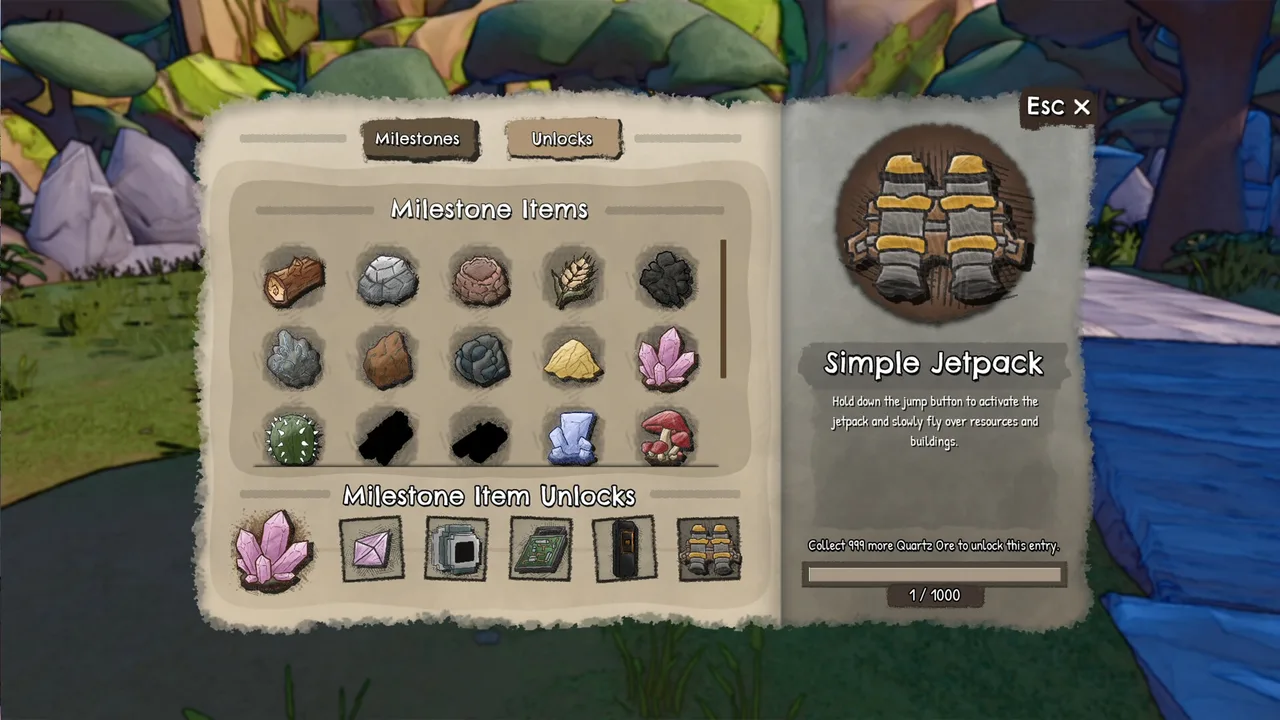
The Milestones screen has two tabs: Milestones and Unlocks. The left panel shows a grid of collectible resources, and the bottom row shows what each resource unlocks. The right panel shows the selected unlock and its requirement. For example, the Simple Jetpack requires 1000 Quartz Ore, shown as a progress bar reading 1 / 1000.
| Resource | Unlock | Requirement |
|---|---|---|
| Quartz Ore | Simple Jetpack | 1000 Quartz Ore (progress 1 / 1000) |
Resources are gathered by hand or automated with machines. Each resource has its own progression: reaching milestone goals unlocks new buildings, crafts, and buffs. The Steam page mentions 20+ resources and 100+ buildings, crafts, and buffs total. The game's short description lists sticks, stones, Bronze Age, Industrial Era, and future tech.
Community guides confirm that holding E for a few seconds is required for some interactions, and that some boons require holding E on specific spots. The developer has not documented all milestone thresholds beyond the Quartz Ore example.
Known Resource Milestones
The table lists resources that appear in official screenshots or are mentioned by name in the material. Values are only included when the material states them. A dash means no official number exists yet.
| Resource | Milestone Goal | Unlock / Requirement |
|---|---|---|
| Oak Wood | Not stated | First resource; used in early buildings |
| Grey Stone | Not stated | Used for early crafting |
| Clay | Not stated | Appears in Milestones grid |
| Wheat | Not stated | Appears in Milestones grid |
| Coal | Not stated | Appears in Milestones grid |
| Sand | Not stated | Appears in Milestones grid |
| Quartz Ore | 1000 | Simple Jetpack |
| Pink Quartz Crystal | Not stated | Appears in Milestones grid |
| Cactus | Not stated | Appears in Milestones grid |
| Blue Crystal | Not stated | Appears in Milestones grid |
| Red Mushroom | Not stated | Appears in Milestones grid |
The grid also shows several ores that are not named in the material. The developer has not released a full list of resource milestones.
Minigame Resources and Boons
Minigames have their own resources and progression. The Boon Guide lists boons tied to specific minigames, but it does not list milestone numbers for those resources.
| Minigame | Resource / Item | Boon | Location / Requirement |
|---|---|---|---|
| Dark Thicket | Heart of the Elder (drop rate) | Boon of Curiosity | Behind waterfall |
| Dark Thicket | Chest opens | Boon of Tenacity | Open chest 10+ times |
| Oasis | Coins | Boon of Growth | Behind autoplanter, hold E on purple arrow |
| The Mine | Purple icon | Boon of Rage | Middle of wall near entry rope |
| The Mine | Purple icon | Boon of Reflection | Left side wall, 2/3 down |
| Fuel Shortage | Yellow spheres | Boon of Accuracy | Shoot 3 spheres out of bounds |
| Data Rush | Rock parts | Boon of Speed | 4th speedrun, first moving platform |
The mine minigame has a resource called Gold Dust, which players report is rare and needed for upgrades. The developer buffed Dusk Gold appearance in 1.0.12. The Oasis minigame has an Infinity upgrade and a multiplier that could go to -1, fixed in 1.0.13.
Automation and Unlock Notes
Automation uses 60+ buildings, including farmers, assemblers, storage units, and pipes. There is no cap on the number of machines you can construct, and you can relocate or dismantle them without losing any items. The Steam page says you can automate all resources and crafts, unlocking late game buildings.
Players report that the building menu is not sorted and that pipes require manual placement. The developer has not documented a drag-to-extend feature. The 1.0.13 patch fixed an infinity pipe item transfer bug, so pipe mechanics may vary by build.
Altars take 4 seconds to produce items, and Loot Manifesters take 300 seconds, per 1.0.11. The 1.0.11 patch also renamed Alloy Forge to Simple Metal Smeltery and reduced fuel quotas for Minigame 4. The 1.0.10 patch fixed the Primary Only Upgrade still giving Stone.
For controller users, the HUD shows V for build, B for blueprints, Tab for inventory. The developer reworked controller support after complaints, but the full release still had issues per reviews.
Last updated: . Game builds change; cross-check details with your installed version.