 Nightwater Guide
Nightwater Getting Started Guide: First Steps and Tips
Begin your journey on a floating island. This guide covers the opening minutes, settings to adjust, the core loop, common early mistakes, how progression opens up, and where to find help.
Your First Minutes
You spawn in an underground room with a shelf labeled Boons to the left of the entrance. The game automatically gives you the Welcome memory when you start. You are on a solitary island ringed by mountains, with a lighthouse in the distance.
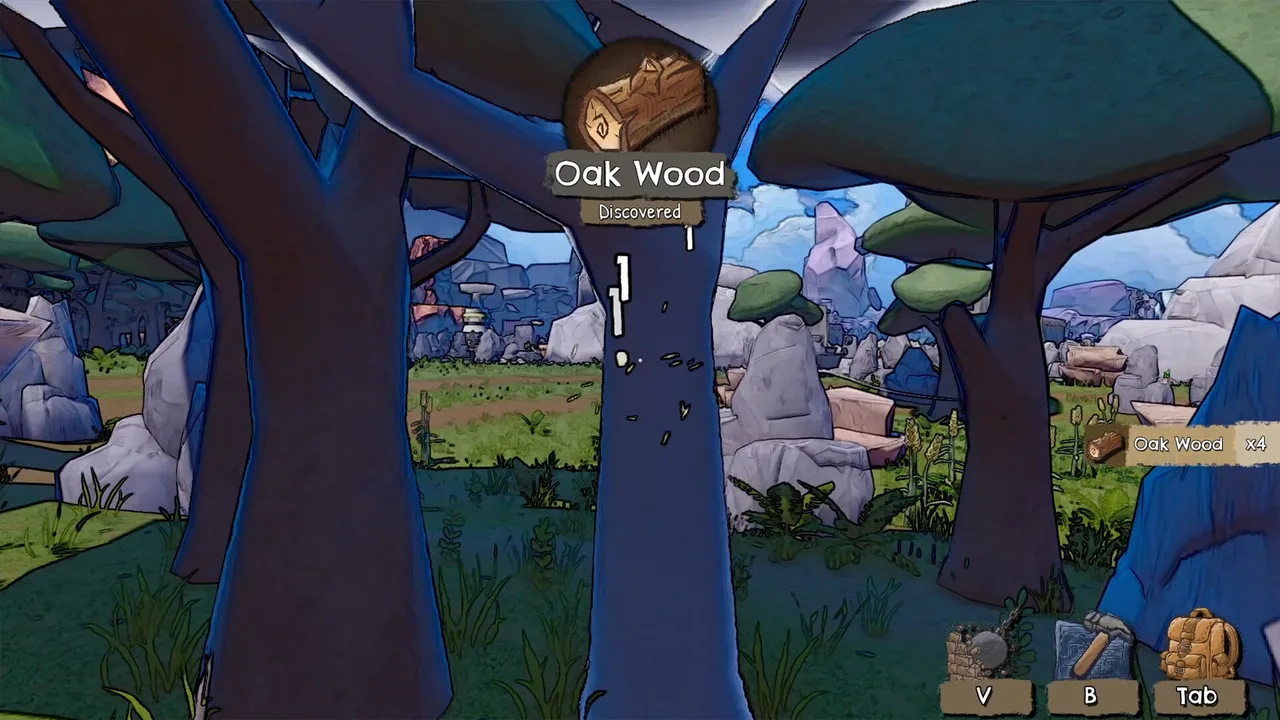
The first task is to gather resources by hand. Hold down E instead of clicking or tapping it once. Holding E for a few seconds collects more resources per action. You will see a toast showing what you discovered, like Oak Wood x4.
Open the building menu with B and the inventory with Tab. V places structures. The HUD shows those hotkeys at the bottom right. You can rotate buildings with R and build multiple with Left Shift.
Settings Worth Adjusting
Before you get too far, open the options menu. The game supports adjustable text size, camera comfort, color alternatives, custom volume controls, and adjustable difficulty. If you find the visual effects bothersome, you can disable many of them, as one player noted.
Controller support is partial despite the store page listing full controller support. Players report that some actions still require keyboard input, and the tutorial may show keyboard keys even when using a controller. If you play with a controller, you may need to keep a keyboard nearby. The developer said they would rework controller support before full release, but the full release still has these issues according to player reviews.
There is no official website, but the Steam page lists the game as having full controller support. The demo on Linux may require Proton Experimental to run, according to a forum post.
The Core Loop Step by Step
The core loop is: gather resources, craft items, unlock new tools and buildings, automate production, and expand the island.
- Gather resources by hand, holding E on trees, rocks, and other nodes.
- Use the Milestones screen (visible in the official screenshot) to see which resources you have collected and what they unlock. The screen has two tabs: Milestones and Unlocks.
- Reach milestone goals for each resource to unlock new buildings, crafts, and buffs.
- Build machines like farmers, assemblers, and storage units. Connect them with pipes.
- Move or deconstruct machines at any time without losing items.
- Play the five minigames to earn permanent upgrades and buffs that help your factory.
- Manifest new biomes to access new resources and continue progression.
You can finish the game without playing minigames, but 100% achievements require them.
Early Mistakes Players Reported
Several early pitfalls come up in the forums. The most common is not holding E long enough. A guide specifically says, don't just left click or press E and walk away, hold E for a few seconds.
Placing buildings can fail if you are too close to the cave or on a slope. Move further out. Also check that you have all required materials; the building icon turns yellow if you lack resources.
During the tutorial, a player reported that the chest appeared locked under unlocks even after reaching the milestone. No confirmed fix is documented yet.
Another player lost boons they had already found after loading a save. They were able to find them again at their original locations. The developer fixed a related bug in patch 1.0.13 where some boons reset after loading.
How Progression Opens Up
Progression flows through resources and biomes. You start with sticks and stones, then move to the Bronze Age, Industrial Era, and beyond. Each resource has its own milestone goals. For example, the Simple Jetpack unlock requires 1000 Quartz Ore, as shown in an official screenshot.
The island expands by manifesting new biomes. The first biome is The Woods, then Mountains, Desert, Snowy Hills, Volcano, and Starlight Fields. Each biome has unique resources and secrets.
Minigames unlock as you progress. The first is Dark Thicket in the forest, then The Mine, Oasis, Fuel Shortage, and Data Rush. Each minigame has its own upgrades and rewards that affect the main game.
There are four endings, and secret areas. The story is optional.
Minigames Overview
There are five minigames. Dark Thicket is a forest minigame where you chop trees and collect resources. The Mine is a digging minigame with pickaxes and runes. Oasis is a desert farming minigame. Fuel Shortage is a snow minigame where you shoot targets. Data Rush is a speedrun platformer.
The Volcano Minigame, which is the Data Rush speedrun, has four tracks and three abilities: Dash, Double-Jump, and Wall-Run. You need each ability to reach the next track. Track 4 can be reached from Track 1, so after finishing Track 3 you go back.
Each minigame has its own currency, like Data in the Volcano minigame. You can spend currency on upgrades, and on the final track you can buy permanent upgrades for the main game.
Where to Get Help
The Steam Community is the main hub for guides and discussions. The official Discord is linked in the developer's posts: https://discord.gg/NBwsXYVq2g. There is also a feedback form mentioned in the demo announcement.
The developer, Studio Ashty, is active in the Steam forums and replies to bug reports. For example, they acknowledged controller support issues and fixed many bugs in patches 1.0.10 through 1.0.13.
Community guides on Steam cover boons, memories, and the Volcano minigame. These are player-written and may become outdated after patches.
Known Bugs and Workarounds
The first week after release brought four small patches, and most of the bugs players hit in the demo period are gone. The ones that mattered for a first session: boons no longer vanish when you reload a save, the cave table now shows the endings you have reached, saving right after an achievement no longer corrupts crafts or buildings, and items stop getting stuck in infinity pipes. Two balance changes are worth knowing too: chili is stronger and pineapple slightly weaker than at launch.
Each patch is summarised, with the pages it affects, on the Updates page. Bugs that still have no documented fix as of 1.0.13 are the ones covered in the FAQ: harvester output not counting toward milestones until you empty the harvester, the iron ingot recipe sometimes not unlocking, and the limited controller coverage.
If you hit something that is not in any patch note, the developer answers on the Steam forums and on Discord, and usually within a day or two.
Last updated: . Game builds change; cross-check details with your installed version.