 Nightwater Guide
Buildings and Automation
Nightwater's factory system lets you automate every resource and craft. This page covers buildings, pipes, storage, linking chains, and the QoL options players use most.
Building Basics
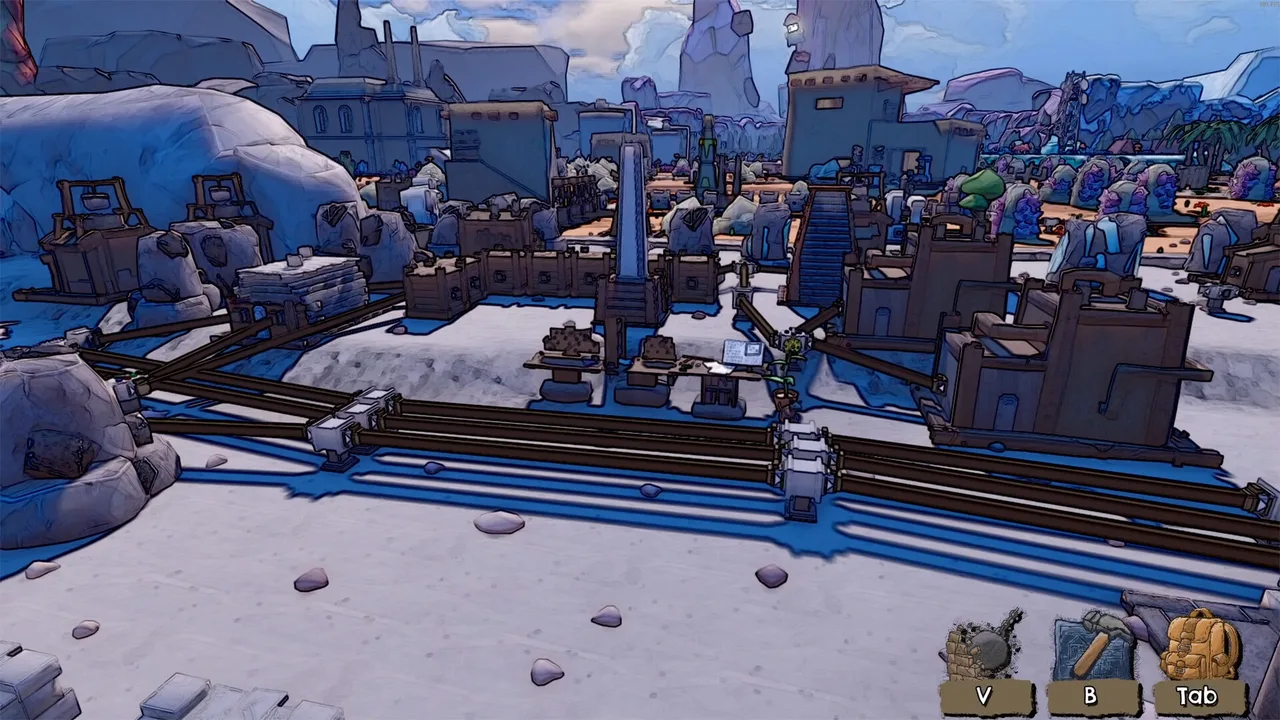
The build menu opens with B, and the blueprint menu also uses B to toggle between placing and crafting. In build mode, R rotates a structure and Left Shift builds multiple copies. The HUD shows a banner reading Press B to exit, and a resource counter around you shows what is available nearby. The developer's notes confirm there are more than 60 buildings. These include farmers, assemblers, storage units, altars, collectors, pylons, teleporters, linking chests, and late game factories that boost speed and efficiency. You can place as many machines as you want. Moving or deconstructing a building never loses items, so you can rearrange freely. A player guide notes that placement is restricted on slopes and near the cave entrance, and a building highlighted yellow means you lack the required materials. The Steam page states that every resource has its own milestone goals, and reaching those goals unlocks new buildings, crafts, and buffs. The Milestones screen has two tabs: Milestones and Unlocks. The left panel shows a grid of collectible resources, and the bottom row shows what each item unlocks. The right panel displays the selected unlock, such as the Simple Jetpack, which requires 1000 Quartz Ore. So check the Milestones screen often to see what your next building will be.
| Action | Key / Input |
|---|---|
| Open build menu | B |
| Toggle blueprint menu | B |
| Rotate structure | R |
| Build multiple copies | Left Shift |
| Exit build mode | Press B (HUD banner) |
Pipes and Linking
Pipes are the main way to link production buildings. You connect farmers, assemblers, and storage units with pipes, and every box has inputs and outputs. The developer's patch notes for the March playtest said all boxes would have inputs and outputs, and the final release reflects that. A player review notes that piping can be annoying because you must walk back and forth to reach inputs and outputs, and there is no automatic way to drag a pipe to extend at max range. You must lay pipes in advance and then hook them up, and if they are too distant, you remove and rebuild. The same review asks for a faster way to lay long runs of pipe, suggesting that when the target length exceeds the current pipe's span, you could place the full run in one go. As of the latest patch, no such feature has been confirmed. The 1.0.13 patch fixed an infinity pipe item transfer bug, which suggests pipes can transfer items continuously, but the exact mechanics are not documented. A forum reply suggests using collector pylon range and teleporters near collectors to reduce pipe spaghetti. You can also position altars in spots that are too far from any resource required for a recipe, and employ linking chests so that valuable items remain in your inventory. The Steam page says you can automate production of every resource and their associated crafting steps, and unlock powerful end-game structures to boost factory speed and efficiency.
| Attribute | Detail |
|---|---|
| Primary function | Link production buildings |
| Inputs/outputs | Every box has them |
| Laying method | Lay in advance, then hook up; if too distant, remove and rebuild |
| Max range extension | No automatic drag; must manually place |
| Long run feature | Not confirmed; requested but no patch |
| Item transfer | Can transfer continuously (from patch fix); exact mechanics not stated |
| Spaghetti reduction | Use collector pylon range and teleporters near collectors |
| Inventory management | Position altars far from resources, use linking chests |
| Automation scope | Every resource and crafting step; end-game structures for speed/efficiency |
Storage and Resource Management
Storage units come in several forms. Chests are the basic storage, and they can be placed inside collector pylon range so that collectors automatically pull from them. Teleporters near collectors help move items across long distances. Linking chests are a special storage type that keeps useful items in your inventory, as mentioned in a forum reply about organization. Altars are production buildings that produce items after a delay. The 1.0.11 patch changed altars to take 4 seconds instead of 1.5 seconds to produce items, so they are slower than before. Loot Manifesters were also fixed in 1.0.11; they were ready in 3 seconds rather than 300 seconds, which was a bug. The patch notes also fixed an issue where certain boons would reset when the game was loaded, which affected storage of boons in the cave. The Memory Chest and Lumina Chest were fixed in 1.0.12, but the exact function of these chests is not described in official sources. The Steam page states that players can place unlimited machines and can relocate or dismantle them whenever they like, with no item loss. This applies to storage too, so you can reorganize your base without penalty. A player review mentions that the crafting tree is simple, with each item max 3 steps, and alternate recipes exist that are simpler but more expensive. This affects storage planning because you might need more of certain resources for alternate recipes.
| Storage/Production Type | Purpose | Production Time | Notes |
|---|---|---|---|
| Chests | Basic storage | not stated | Can be placed in collector pylon range for automatic pull |
| Teleporters | Move items across long distances | not stated | Placed near collectors |
| Linking chests | Keeps useful items in inventory | not stated | Mentioned in forum reply |
| Altars | Production buildings producing items after delay | 4 seconds (1.0.11, previously 1.5) | Slower than before |
| Loot Manifesters | not stated | 3 seconds (1.0.11, previously 300, bug fix) | Fixed in 1.0.11 |
| Memory Chest | not stated | not stated | Fixed in 1.0.12 |
| Lumina Chest | not stated | not stated | Fixed in 1.0.12 |
Automation Strategies
Automation in Nightwater is forgiving and simple compared to games like Factorio or Satisfactory. A player with 21 hours says the automation is on par with Factorio or Satisfactory, while another with 5 hours says it is not a real automation game because you can gather everything by hand. The Steam page encourages building machines to do the work for you, and says you can automate every part of your production chain. The key is to use farmers, assemblers, and storage units, linked with pipes. A forum reply about organization suggests placing chests within collector pylon range and later adding teleporters near collectors, creating altars anywhere too far from a resource, and using linking chests to keep useful items in your inventory. That reply also says the game gives you buildings to support not organizing anything, meaning you can be messy and still succeed. The 1.0.13 patch buffed Chili and nerfed Pineapple, which are likely resource-specific buffs, but the details are not documented. The same patch increased the Infinity upgrade gold amount in the oasis minigame, which affects automation indirectly because minigame upgrades can boost production. A player review notes that the factory part feels clunky but manageable, and that sometimes setting up automation never pays off compared to making items by hand. So you can choose to automate only the resources you need for milestones and minigame progression.
| Aspect | Details |
|---|---|
| Automation complexity | forgiving and simple; on par with Factorio or Satisfactory (21-hour player) vs. not a real automation game because you can gather everything by hand (5-hour player) |
| Key components | farmers, assemblers, storage units, linked with pipes |
| Organization tips | chests within collector pylon range, teleporters near collectors, altars anywhere too far from a resource, linking chests to keep useful items in inventory; buildings support not organizing anything |
| 1.0.13 patch changes | buffed Chili, nerfed Pineapple (details not stated); increased Infinity upgrade gold amount in oasis minigame |
| Player review | factory part clunky but manageable; automation sometimes never pays off vs. making items by hand |
Minigame Buildings and Buffs
Each of the five minigames has its own buildings, upgrades, and buffs that carry over to the main factory. The Steam page says every minigame offers a distinct gameplay loop, with items, upgrades, and progression that unlock new buildings, crafts, and buffs usable beyond the minigame. For example, the woods minigame (Dark Thicket) can unlock the Boon of Curiosity, which, as a forum reply noted, boosts the Heart of the Elder drop rate by half. The mine minigame has runes that increase rarity and radius, and a player guide mentions the mine has a pickaxe quality bug where the displayed rune quality is not the average but the last selected rune. The developer has not confirmed a fix for that bug as of 1.0.13. The volcano minigame (Data Rush) gives Data as a currency, and on the final track you can spend Data on permanent upgrades outside the minigame. The 1.0.11 patch doubled progression speed for minigame 5 and reduced fuel quotas for minigame 4. The 1.0.10 patch reworked the Gauntlet Data Rush part, making it easier. A player review says the minigames are required to get some more advanced buildings, but a forum reply says that completing the game is possible without touching the minigames, though 100% achievements require all of them. So if you want specific buffs like faster wood farming or pipe speed, you need to play the corresponding minigame.
| Minigame | Notable features | Buffs/effects | Patch notes |
|---|---|---|---|
| Woods (Dark Thicket) | Unlocks Boon of Curiosity | Boosts Heart of the Elder drop rate by half | not stated |
| Mine | Runes increase rarity and radius; pickaxe quality bug where displayed rune quality is the last selected rune, not the average (unconfirmed fix as of 1.0.13) | Rarity and radius increases | not stated |
| Volcano (Data Rush) | Data as currency; on final track, spend Data on permanent upgrades outside the minigame | Permanent upgrades outside the minigame | 1.0.10 reworked Gauntlet Data Rush part, making it easier |
| Minigame 4 | not stated | not stated | 1.0.11 reduced fuel quotas |
| Minigame 5 | not stated | not stated | 1.0.11 doubled progression speed |
Known Issues and Workarounds
Several bugs have been reported and fixed. The 1.0.13 patch fixed a bug that caused craft and building corruption when saving after an achievement, a bug where endings don't show in the cave table, a bug that could set the oasis multiplier to -1, and an issue where certain boons would be lost after reloading. It also corrected Data Rush infinite upgrades so they work as intended. The 1.0.12 patch fixed the Memory Chest and Lumina Chest, moved Dusk Gold to a higher spot in the mine, lowered the difficulty of Track 4, and fixed permanent movement speed text in the woods minigame. The 1.0.11 patch renamed Alloy Forge to Simple Metal Smeltery, fixed Loot Manifesters, and fixed Minigame 4 WIP icon.
| Patch | Fixes/Changes |
|---|---|
| 1.0.13 | Fixed craft/building corruption after achievement, endings not showing in cave table, oasis multiplier set to -1, boons lost after reloading; corrected Data Rush infinite upgrades. |
| 1.0.12 | Fixed Memory Chest and Lumina Chest; moved Dusk Gold higher in mine; lowered Track 4 difficulty; fixed movement speed text in woods minigame. |
| 1.0.11 | Renamed Alloy Forge to Simple Metal Smeltery; fixed Loot Manifesters; fixed Minigame 4 WIP icon. |
A forum thread about lost boons reports that boons can disappear from the cave list, but going back to their locations lets you pick them up again. The developer has not posted a fix for that specific issue. The mine pickaxe quality bug is still unconfirmed. A player reports that the yellow stone resource in the mine is actually Gold Dust, and it appears higher in the mine after 1.0.12. For Linux users, the demo requires Proton Experimental to run, according to a forum thread. The developer has not confirmed a fix for controller support complaints, but a reply says they will rework it before full release, and the full release still has mixed feedback on controller.
Last updated: . Game builds change; cross-check details with your installed version.